
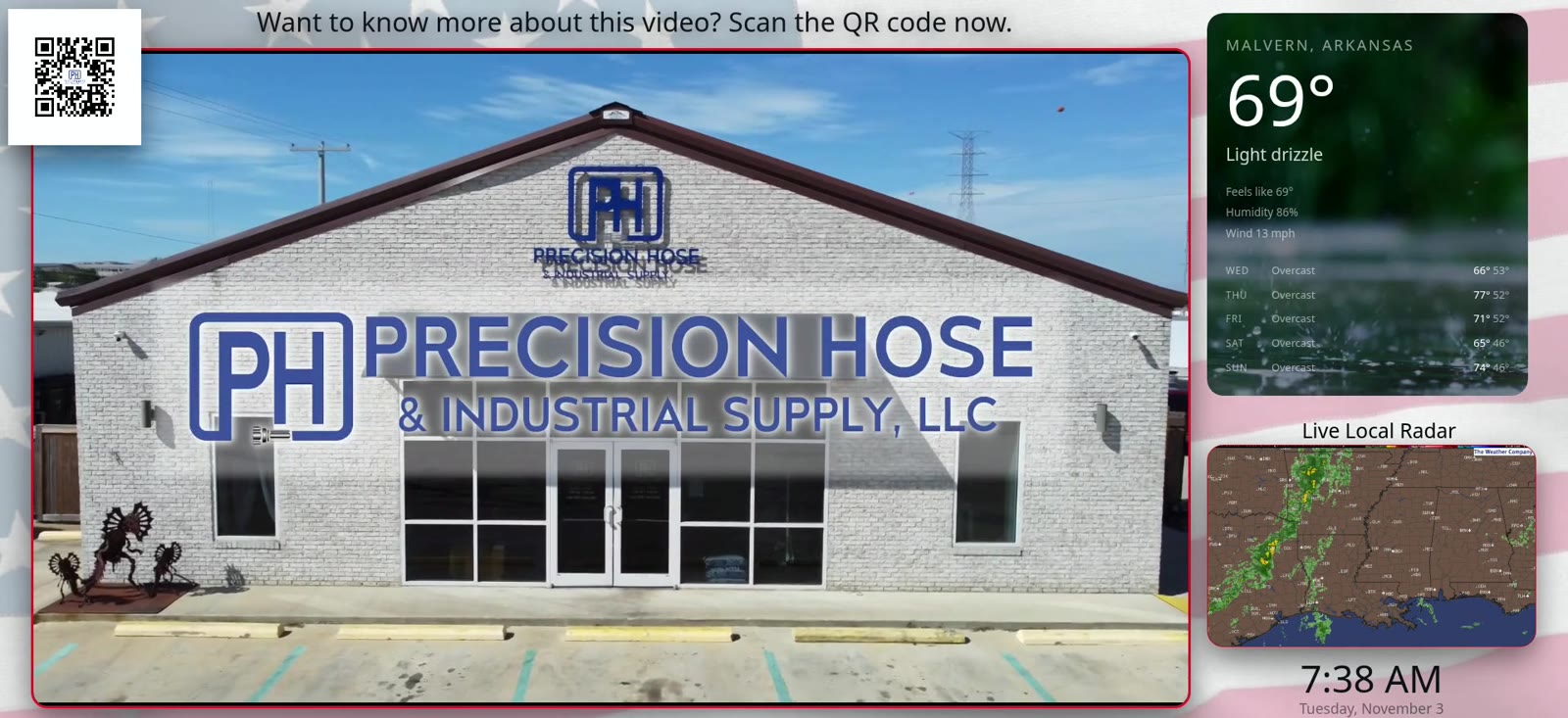
At 7:38 on the morning of Tuesday, November 3, a Screens to Signs player was recorded as it ran. The big panel was playing adverts for Fast Wrapz and Precision Hose. In the top right corner, a smaller panel read: Malvern, Arkansas. 69°. Light drizzle. Behind the numbers was a photograph of rain.
That minute of footage is the video on the Screens to Signs home page. This article walks through the weather side of it: what is on the screen, where it comes from, and what happens when the weather turns dangerous.
The short answer
Yes, digital signage can show the weather, and a Screens to Signs screen shows it for its own town. The weather panel gives the current temperature, the conditions in words, what it feels like, the humidity, the wind and a five-day forecast. A second panel shows a live radar map. When the National Weather Service issues a warning for the screen’s location, the warning either takes over the screen or runs along the top, depending on how serious it is. That warning feature can be switched off for any screen.
What the weather panel shows
Here is everything on the weather panel in that recording, top to bottom:
- The town and state, in capitals: MALVERN, ARKANSAS
- The temperature, the biggest thing in the panel: 69°
- The conditions in plain words: Light drizzle
- Feels like 69°, humidity 86%, wind 13 mph
- Five days ahead, one line each, with the conditions and the high and low: Wednesday overcast, 66° and 53°; Thursday 77° and 52°; Friday 71° and 52°; Saturday 65° and 46°; Sunday 74° and 46°
There is nothing to tap and nothing to scroll. Somebody standing at a counter gets the whole picture in the time it takes to glance up.
The picture behind the numbers
The weather panel is not a flat box. On that drizzly morning it sat on a close-up photograph of rain landing on water, so the panel said “wet” before anyone read a word of it. The background is there to match the conditions outside.
The panel has rounded corners and its own space on the layout, beside the advert rather than on top of it.
Live radar
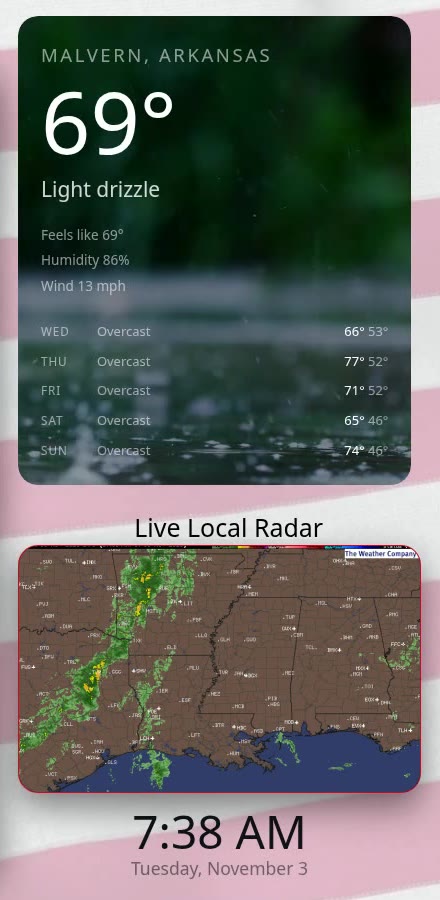
Under the weather panel is a second panel headed Live Local Radar. It is a radar map with the familiar green and yellow returns, and it carries The Weather Company’s mark in the corner. In the November 3 recording it showed a band of rain running up through Louisiana.
Under the radar sits a clock with the date, which on that morning read 7:38 AM, Tuesday, November 3.
Every screen has its own town
The weather on a Screens to Signs screen is for the town that screen is in. The screen in the recording was set to Malvern, Arkansas, which is where JM Marketing is based. A business with screens in two towns sees each town’s own weather on each screen, not one forecast for everybody.
The same goes for warnings. A warning reaches a screen because it covers that screen’s location.
When the weather turns serious
When the National Weather Service issues a warning for a screen’s location, the screen shows it. How it shows it depends on how serious the warning is: it either takes over the whole screen, or it runs along the top while everything else carries on underneath.
A business can switch this off for any screen. It is set per screen, not all-or-nothing, so warnings can be on the screen by the door and off on the one behind the bar.
One thing needs saying plainly. The warnings come from the National Weather Service, but a screen on a wall is not a replacement for a weather radio or official alerts. It is one more place people might see a warning. It is not the thing anybody should rely on to wake them up.
Weather is one panel, not the whole screen
In the recording the weather shares the screen with everything else the business wants to say:
- The main panel plays the adverts and video.
- A QR code in the top left corner, under the line “Want to know more about this video? Scan the QR code now.” The code changes with the video that is playing, so each advert shows its own.
- Along the bottom, a strip of sponsor and partner logos, four at a time, changing as it goes.
- Down the right-hand side, the weather, the radar and the clock.
Each of those is its own panel, and each can be on its own schedule. You can see the full list of panels on the What it does page.
Why weather earns its place
Most of what a business puts on a screen stays the same for weeks: the menu, the opening hours, this month’s offer. People see it once and stop looking.
The weather changes through the day. It gives people a reason to glance up again, and when they do, the advert is right next to it. That is the point of putting it there. It is also simply useful to whoever is waiting, whether they are about to walk back out to the car or deciding whether to sit outside.
Talk it through
If you would like your town’s weather on a screen in your business, call Jeff on 662-422-1809, or tell us about your business on the quote form. The common questions about internet, hardware and installation are answered on the Questions page.